Tampilkan postingan dengan label tips. Tampilkan semua postingan

HOW TO: Use Glo Blackberry Subscription on Android Devices

Posted by Unknown Selasa, 03 Desember 2013 0 komentar
Airtel limiting non Blackberry devices from using their BIS plans, has cost much sleepless night to many bloggers. Sequel to this post "#Glo is going to have more customers. Welcome To Glo BIS (3.75GB For N1,000)" I decided to answer the much asked questions. 

step by steps in configurating you GLO BIS to work on Android phones and samsung using blackberry internet Services.

*To Buy GLO BIS => For Glo BIS Monthly Plan (3GB Data), text "BBCMonth" to 777 or dial this*777*21# @ N1000 only. 

*for Glo BIS Weekly Plan (700MB Data), text "BBCWeek" to 777 or Dial
this*777*22# @ N400 only.

=>Goto your settings. 
=>select Wireless and
Network.
=>select Mobile Networks
or Mobile Data Scroll down. =>Create a new Access Point Name (APN),click on APN then select the New
APN and type "Glo BIS" as the APN name. 
=>In the new APN just
type: blackberry. net. 
=>While the others remains blank, save and connect. 

Don't be greedy! share this update with your friends to benefit.


Add TechzDot on BBM: 25C037D0
For Trending Updates At Your Finger Tips
If you have any questions or suggestions feel free to drop your comment in the comment box below.

Baca Selengkapnya ....

Airtel Blackberry Unlimited On Android Phones

Posted by Unknown Senin, 11 November 2013 0 komentar
Airtel Nigeria has become the best when it comes to provision of best and cheapest data bundle for browsing in this country recently. This is how I have used Airtel blackberry unlimited on modem and android phone to browse the internet without any limitation. With this method,you can also use your Tecno Android Mobile as a modem in using the Airtel blackberry unlimited on modem and android phone.

How do I use airtel blackberry plan for Android Phones And Modem

1. Recharge Airtel with 1600 Naira.

2. Migrate to airtel club 10 by dialing this *166# or *101#

3. Subscribe to AIRTEL OFFICIAL BLACKBERRY plan Dial *440*16# to subscribe and You will get a welcome message to Confirm that you now have 2.10 gig i.e 2.0GB by dialing *141*712*0#.

4. Note airtel doesn't allow you to use your gigs for your Android phones and Android tabs,tweaking the networking is our goal and its achievable by following this simply step,You subscribe for Airtel 10mb plan.

This 10mb will unlock your blackberry 2.0GB enabling it to work for your other devices.

5. Final steps,Dial *141*712*11# That's all you can now enjoy 2.0GB on your iPhone and iPad Confirm that you now have 2.0GB by dialing *141*712*0# or *123*10# to check your data.

Configure Android phones and Android Tablets using the official access point username and password

ALTERNATIVE METHOD


Follow the steps listed below to start using Airtel blackberry unlimited on modem and other android phone and tabs.


1. Load a recharge card of N1600.

2. Dial *440*16# on your Airtel Sim and N1500 will be deducted from your balance.

3. After that,you will receive a message from Airtel that your blackberry subscription live and you should remove your battery and start browsing.

4. Instead of removing your Sim just dial *141*712*11# for 10MB daily use which will cost you N100.

5. Now start browsing the internet with your 2.01GB data for complete 1month.

Enjoy and tell your friend and Like our facebook fans page you leavv your commnt here.

Add TechzDot on BBM: 25C037D0
For Trending Updates At Your Finger Tips
If you have any questions or suggestions feel free to drop your comment in the comment box below.

Baca Selengkapnya ....

How To Subscribe For Your BBM Monthly 300 Naira Only

Posted by Unknown 0 komentar
All networks are working hard to make sure they gain more user’s, Now Airtel has come up with a wonderful stuff to help all BBM user Enjoy their BBM at a very cheap rate

Now Follow The Below Steps To Subscribe For BBM Monthly

* Dail, *440*22# * N300 will be deducted from your account.

Know you can use your BBM for a whole month
Isn’t that wonderful, you are subscribing for just N300 .
Know Enjoy this stuff
Add TechzDot on BBM: 25C037D0
For Trending Updates At Your Finger Tips
If you have any questions or suggestions feel free to drop your comment in the comment box below.

Baca Selengkapnya ....

10 Tips How to Optimize Your Website/Blog 2014

Posted by Unknown Jumat, 01 November 2013 0 komentar
1. Include Meta and title tags. Some search engines still use Meta Keyword, Meta Description and Title tags to catalog and rank Web pages. Be sure to place a title tag at the top of each page to identify the document's overall content. You should also write an accurate Meta description tag because it's often used by search engines to describe a site in search results. And don't neglect to include a Meta keyword tag to reveal the most important keywords for each page to search engine spiders. This is one Website optimization trick you do not want to overlook because Meta tags can be the key to getting "found" by search engines.> Learn How To Write Title Tags For Your Web


2. Place keywords strategically throughout your content. Having keyword-rich content is the key (pardon the pun) to performing well with search engines. Load your Home and other critical pages with important keywords, since it may be the only page indexed by some engines. If you're not sure which keywords to weave throughout your Website, try using software like WordTracker. It's one of the leading tools you can use for website optimization, and it's available through a free trial.

You can learn here> How To Write A Keyword Rich Blog Post

  • Keyword research will help you to identify keywords that are high in demand and relatively low in supply. Demand is important because it makes up the number of people who use the keyword to obtain information that is related to the keyword over the internet. Supply matters because it actually represents the number of competitors for that keyword. The higher the demand, the more traffic you will receive from the keyword. The more the supply, the harder it will be to get a sufficient listing in the search engines.
  • Once you've determined the best keywords to use, place them strategically on each Web page. Focus on areas that register well with search engines, including bold headings, near the top of the page and at the end of the page. You should also embed keywords in the anchor text used to describe links, your domain name and title and Meta tags. Try to use keywords to create a theme throughout the content on your site. Search engines tend to look for a theme or common topic on a Website in an effort to deliver more relevant results for searchers.
  • Keep in mind that keyword proximity is also important. So place your keywords as closely together as possible, while making sure your sentences remain clear. Finally, and perhaps most importantly, ensure a proper keyword density or weight. This involves the proportion of keywords to the rest of the text. The greater the percentage of keywords, in relation to other text, the better.

3. Use your primary keywords in an H1 header tag near the top of your page. Google gives extra weight to text located within header tags when computing PR[citation needed]. Also use a couple of H2 tags on your page because they count as well.

4. It's always good to inspect your website after any updates, especially changing tags. It is very easy to create broken links and design flaws which may affect your search engine optimization, not to mention your traffic and revenues. You will also need to create a sitemap.xml file (generally provided for free) to submit to search engines to optimize your website.


5. Keep your content updated and provide enough content. Good Web content is a critical factor in keeping site visitors interested and coming back for more. It's also the key to higher search engine rankings. Major search engines typically require you to have at least 200 to 250 words on each Web page. So it's important to include plenty of valuable content to appeal to search engines-and visitors.

  • It's also crucial to keep your Website updated with fresh content. This lets search engines know the content on your site isn't stale, plus it will keep your site appealing to visitors looking for the latest information. Granted, it can be time-consuming to keep your content updated. However, the potential benefit from this Website optimization trick makes it well worth the effort.

6. Avoid using frames if possible. Frames, which are being used less and less, enable you to split a page into pieces and section off static content to decrease download times. However, today's Websites are larger and require more dynamic elements than are feasible with frames. Having a complex frame set up, can keep you from creating a search- engine friendly Website that draws a high ranking.
  • Frames allow you to split a page into pieces and section off static content to decrease download times. However, they can cause navigation difficulties and prevent search engines from being able to access every page on your Website. You could use a site map to address this problem, but it's simpler to not use frames for your Website.

7. Build incoming or back links. Building good incoming or back links can also increase your search engine ranking and Website traffic. Here's why this Website optimization trick is so crucial: Most major search engines rank Web pages based on the number and the quality of links that point to the Website (link popularity). They do so because it's very difficult for Web masters to "fake" good links. As a result, link analysis gives search engines a useful means of determining which pages are good for particular topics.

  • Place links to all of your pages on your home site as well as every other page on your site in order to make it very easy for the search engine spiders to crawl your site, if possible.

8. Create a Site Map page and link to it directly from your home page. On your Site Map page place links to every other page in your website. This guarantees that every page on your website can be reached with a maximum of two mouse clicks or "link follows" by the spiders.

  • Listing your Website with relevant directories and portals is an ideal way to build valuable incoming links. You can also write articles, forum/blog posts, and testimonials and include a link pointing back to your site. In addition, you can trade links with Websites that complement yours. Just make sure they're not competing Websites. The main objective is to link to sites that are closely related to your site's topic. If your Website is about software, for example, link only to sites relating to the topic of software.
  • As you build incoming links, keep in mind that search engines look for Websites that are useful for site visitors. If the linking structure of your Website indicates that it is helpful and informative, you'll generate more favorable search engine rankings. You'll also enjoy a steady stream of targeted traffic from your link partners.

9. Use 'alt' tags to describe your photos. If you can use a keyword or two in your alt tag that is even better, but be careful here that your alt tag accurately describes the photo or Google may consider it to be spam.

10. Validate Your HTML Code. While search engines don't care whether your HTML code is error-free, they rely on the basic correctness of the code to find out which portions of your web page to index. If your HTML code contains errors, it is possible that only portions of your web page are included in the search engine's database. The errors, while undetectable in a web browser, may lead the search engine software to think that some of the text on your page is part of the HTML formatting information rather than your site's content. As a result, the search engine may ignore that text, and your web page will not be shown in its results page. (i.e.) The <! DOCTYPE HTML PUBLIC "-//W3C//DTD HTML 4.01 Transitional//EN" "Http://www.w3.org/TR/html4/loose.dtd"> Is required

Add TechzDot on BBM: 25C037D0
For Trending Updates At Your Finger Tips
If you have any questions or suggestions feel free to drop your comment in the comment box below.

Baca Selengkapnya ....

How To Write A Keyword Rich Blog Post

Posted by Unknown Selasa, 29 Oktober 2013 0 komentar
Keyword Research plays an important role for a good optimization of your article/post. If you are writing a good quality post without finding the best keyword then it could find difficulty in getting into the top results of Google. So, it is highly advisable to make an effort in doing keyword research for finding the keyword with maximum search volume, high CPC( cost per click) and low competition.

There are some other tools which are available for keyword research but i find the ones in this article very helpful even to my daily blogging

You can learn here> 10 Tips How to Optimize Your Website/Blog 


Long Tail Pro 

Long Tail Pro is a keyword research tool (its main function, besides we can use it to do some other tasks such as checking the website rank in search engines, checking the domain available etc., but I like the keyword research section most)

The man behind this tool is Spencer Haws, who is famous all over the world as a pioneer and inspirer in niche site building. It is a paid application and for this also you have to loosen up your pocket but no worries Long Tail pro offers 10 days trial absolutely  free in order to satisfy its customers regarding the utility of the application.so first use its trial version and if you find it productive you can buy as it is going to beneficial for you in a long run.to try its trail version follow the link- www.longtailpro.com

Ubersuggest:> How it works:

Get keyword ideas with Übersuggest the free keyword suggestion tool that makes good use of Google Suggest and other suggest services.
  • Write a term in the box.
  • Choose a language and a source. Übersuggest can get suggestions either from regular Web search or from search verticals like Shopping, News or Video (more to come).
  • Übersuggest takes your base term, add a letter or a digit in front of it, and extracts suggestions for it.
  • Click on each word to get further suggestions based on that term.
  • Add each keyword to your basket clicking on the plus sign on its left.
  • Add all visible keywords to your basket clicking on the large grey button.
With this free keyword tool you can instantly get thousands of keyword ideas from real user queries! Use the keywords to get inspiration for your next blog post, or to optimize your PPC campaigns.

Google auto suggest

This is a tool by keywordtooldominator which actually takes default feature of Google auto suggestion to next level.you can easily find all auto suggested keyword and can select accordingly that suits you and you think will be good in order pull targeted readers to your blog.

here is the screenshot  of Google auto suggest showing results for the queried keyword:

How to drive traffic to your blog from YouTube? Click HERE 

Add TechzDot on BBM: 25C037D0
For Trending Updates At Your Finger Tips
If you have any questions or suggestions feel free to drop your comment in the comment box below.

Baca Selengkapnya ....

10 Things That Shouldn't Be On Your Blog

Posted by Unknown Minggu, 27 Oktober 2013 0 komentar
Photo credit: sillygrrl.com
  1. Generic text that comes with plugins, email list boxes, or contact forms: Take it out or personalize it.
  2. 45 tags / labels / categories: Readers aren't going to wade through that and search engines don’t like it either. Pick your top five to 10 and feature those.
  3. WordPress meta tags or the Blogger Navbar: Don’t care if you use them, they gotta go!
  4. Blog awards and memes: CLUTTER.
  5. Super up-close photos of your (or anyone else’s) face: Always scary. (See also: wounds and bugs with more than six legs)
  6. Huge paragraphs: This makes posts difficult to read. Keep it to a few sentences per paragraph for easy skim-ability. (totally a word!)
  7. A navigation with only one or two links: Looks awkward, stick them in the sidebar.
  8. A list of recent posts: Generally the the same thing that’s 10px away on your homepage and a waste of space. Try popular or favorite posts instead.
  9. Search bar at the top of the sidebar: Is that the first thing people are looking for when they visit your blog? Move it down and put a blog intro and photo at the top instead.
  10. Centered text on posts: NOT ALLOWED. People! Centered text is difficult to read and looks like a newbie mistake. It’s not different or artistic or poetic, you’re just making it hard for your readers to get through your posts. Left align or justify your text. Seriously. (OK for sidebars and one line photo captions)


Add TechzDot on BBM: 25C037D0
For Trending Updates At Your Finger Tips

Baca Selengkapnya ....

How To Get Technorati Approval

Posted by Unknown 0 komentar
I purposely write this post for the new beginner bloggers out there who are finding it hard to get approval from Technorati. To be brief, Technorati is an important blog directory which consists of a huge collection of blogs. These blogs are divided in different categories so it provides an easy navigation for a new visitor.

And it is being said that if you want to be a successful blogger then you have to make your online presence on every possible sites.

Now lets go straight to the steps as given below:

There are three basic steps that we need to cover in order to get our Blog’s presence in Technorati.

Register > Submit your blog > Claim your Token

The very first step is to get registered on technorati.com, Once you are done with your free registration on technorati.com , the next step is to Submit your blog with all your details as:


The next important step is to claim your site. With this, you will be getting a confirmation email from technorati with a token code. Now, you need to put this token code in the content body of your new post and publish it.

NOTE: One basic mistakes that most Bloggers commit is that they update this token code with their previous post. But now, there are two ways of putting your token Id in your post.
  • Make a new post and name it as ” Test for Technorati” or 
  • Add your Token Id with a recent post that you are going to publish .
When you are done with these steps then Technorati will crawl your blog and it could take some days to get your claim approved .

Once your claim is done, you can remove your Technorati token Id from your post. You can find the status of your claim process in your account of Technorati. It usually take few days to get your blog/website to get approved but it is worth to get it registered on Technorati.

If you are finding any difficulty in submitting your blog to Technorati then you can ask your doubts via comments below. And if you have some more important Websites or Directories where a blogger can submit his blog then please share it in the comment box below. Thanks!

Baca Selengkapnya ....

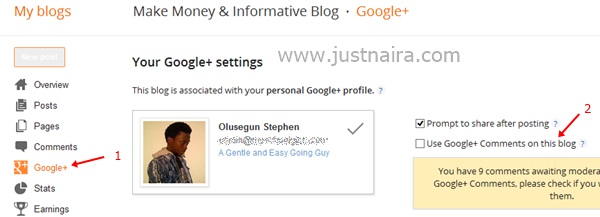
How to Enable/Disable Google + Comments Box

Posted by Unknown Minggu, 20 Oktober 2013 0 komentar
  1. Sign in to your Blogger Account and click on the blog you want to include/exclude the Google plus comments box.
  2. Click on Google + link, and then check the box to enable or uncheck the box to disable it by clicking on the Use Google+ Comments on this blog box. See the image below:


Baca Selengkapnya ....

Hottest Weight Loss Fad: The Ice Cube Diet

Posted by Unknown Rabu, 16 Oktober 2013 0 komentar


 Eat Less And Loss 62lbps Daily

Eat less and loss 30 pounds daily? 

I read it somewhere that someone lost 30 lbs just by eating ice. So I got to thinking that an ice diet may just be what I need.

Why would an ice diet be something that I am interested in?

   YES IT WORKS! including a prepared printable calender you could use to loose at
 least 30 pounds daily.

Going on the Ice Cube Diet doesn't mean the slimmer eats only regular ice instead of real food. However, the ice cubes, which are delivered straight to your home, do contain extracts of a plant known to suppress appetite.
Developed by Desert Labs, the Ice Cube Diet is not expensive (about $1.50 a day) – while also being reportedly very healthy and providing a boost of energy for the body.

Each cube contains extract of the Hoodia plant, which is believed to suppress appetite and offer a boost of energy. This way, a single cube a day is enough to lose weight, without actually changing a thing about your lifestyle.


In other words, the Ice Cube Diet promises to do that which no other diet can: encourage weight loss with zero changes to regular eating patterns and workout routine.

“Hoodia is an ancient supplement used for thousands of years by the San Kalahari Bushman. Proven to ward off appetite during long journeys, the active ingredient, P57, signals your brain you’re full,” a post on the Desert Labs webpage notes.

I love physical activity but cannot exercise because of underlying health issues. The medication I am on has made me gain some 70 pounds. I miss my old weight of 160 that I was years ago; I felt good and healthy and didn't have to keep buying new clothes.
I like the idea of eating ice because it is lazy exercise. I sit there munching away on ice and my body is forced to heat it up burning all those excess calories and I can eat anything I want.

Soo! Here is the math: According to staceyreid's blog, A calorie is defined as 1ml of water being heated up 1C. To heat a litre of water from 0C to 37C is 3700 calories. The bags of ice at the local store are 2.7 kg and they are -10C. So if I ate that entire bag of ice, I would have to produce 126900 calories to heat that up. And if it takes 3500 calories to lose a pound of fat I would lose 36 pounds per bag.

Too good to be true!
 Here we go! I stumbled upon the best calender you could use on a scheduled basis in order to LOSE 36 POUNDS DAILY BY EATING ICE CUBES -Print it at Stacerid Calender 

Baca Selengkapnya ....

Why Blogging Is a Long Term Money Maker

Posted by Unknown Selasa, 15 Oktober 2013 0 komentar
Over time, the blog will overtake the income made by Twitter and Email. A blog post has a much longer lifespan and can be indexed by a search engine and therefore receive traffic for months, even years, after the post has been written. By comparison, very few people will ever check someone’s Twitter history and all the emails I’ve sent out about the Footer Ad have been deleted by now.

Your blog is your foundation. However, to maximum its income, you need to add support systems like Twitter and Email. If all I had was the blog post for this promotion, I would have missed out on more than 2/3 of the income I could have made in the first 24 hours.
You might also like >>

How To Write A Keyword Rich Blog Post


You should continue working on your blog but you should also work on developing your Twitter community and newsletter subscriptions. If all you have is a blog, you’re leaving a lot of money on the table.
By John Chow.

Baca Selengkapnya ....

NEW RESEARCH: E-Cigarettes Help Smokers Give Up Bad Habit

Posted by Unknown Rabu, 18 September 2013 0 komentar

E-cigarettes produce a vapor that contains nicotine, and researchers found that the devices are helping people cut down and quit smoking.

The research was conducted by the University of Auckland in New Zealand and published in the European Respiratory Society journal. They found that 7.3 percent of e-cigarette users quit smoking after six months. This compares to 5.8 percent with the patch.

New research suggests that electronic cigarettes are just as effective as nicotine patches in helping people quit smoking. 

 E-cigarettes have also proved helpful in helping smokers cut down their nicotine intake. Fifty-seven percent of e-cigarette users cut down their cigarette use in half, which compares to 41 percent of nicotine patch users.

“The key message is that in the context of minimum support, e-cigarettes are at least as effective as nicotine patches,” said Professor Peter Hajek, the director of the Tobacco Dependence Research Unit at Queen Mary University of London.

He added: “E-cigarettes are also more attractive than patches to many smokers, and can be accessed in most countries without the restrictions around medicines that apply to nicotine replacement therapy or the costly involvement of health professionals. These advantages suggest that e-cigarettes have the potential to increase rates of smoking cessation and reduce costs to quitters and to health services.”

Hajek also notes that e-cigarettes are a more economical option to quitting smoking, and may even help reduce individual health care costs.

By Marissa Brassfield of CalorieLab

Baca Selengkapnya ....

Prediksi Update Google Pagerank 2013

Posted by Unknown Jumat, 18 Januari 2013 0 komentar

[Indonesia]
Prediksi Update Google Pagerank 2013 - Hallo Sobat blogger, Kali ini saya akan mencoba mengulas kapan Google mengupdate Pagerank lagi. Apa itu page rank dan apa fungsinya?? Pagerank adalah sesuatu yang sangat berharga bagi para blogger, karena jumlah pagerank yang didapatkan oleh blog milik blogger mencerminkan popularitas blog tersebut.


Prediksi Update Google Pagerank 2013 :

  1.     Update Pagerank Pertama : 28 Januari - 6 February 2013
  2.     Update Pagerank Kedua : 27 Juni 7 - Juli 2013
  3.     Update Pagerank Ketiga : 29 September - 4 Oktober 2013
  4.     Update Pagerank Keempat : 24 Desember - 29 Desember 2013


[English]

Google Pagerank Update predictions 2013-Hello Friend blogger, this time I'll try reviewing when Google updated the Pagerank again. What is page rank and what does it do?? Pagerank is something that is very valuable for the bloggers, because the amount of pagerank that is obtained by blogger's blog reflects the popularity of the blog.


Google Pagerank Update prediction: 2013
  1. First Pagerank Update: 28 January – 6 February 2013
  2. The second Pagerank Update: 27th June 7th-July 2013
  3. Pagerank Update three: September 29-October 4, 2013
  4. The fourth Pagerank Update: December 24th-December 29, 2013
The articles about Google Pagerank Update Predictions 2013, may be useful for the reader. Get ready just waiting for google pagerank Update

 Sekian Artikel tentang Prediksi Update Google Pagerank 2013, semoga bermanfaat bagi pembaca. Siap-siap saja menanti Update google pagerank


Baca Selengkapnya ....

Facebook will Make Search

Posted by Unknown 0 komentar

Facebook Make Search engines Themselves-different from the rumors and speculations that circulated, apparently what is meant by the ' mysterious ' event is the release of the Facebook Graph Search.

Finally, Facebook opening mysterious events surrounding the ' card ' them. Facebook released a new product called the Facebook Graph Search on this day (16/01 – Indonesia time or 15/01 – United States time).

As reported by the Guardian newspaper (15/01), Facebook Graph Search is the first major product since the company held ITS IPO in may 2012.

"Graph Search is a new way for Facebook users or others who want to get information about everything on Facebook," explained Mark Zuckerberg when he refers to press release in Menlo Park on Tuesday (15/01 – time Indonesia).

With the launch of this new product, then any Facebook user can find information about people, places, photos, Favorites and everything contained in Facebook with ease.

Of course, the rise of search engines it will be a serious threat to Google. Willing or not Facebook Graph Search Agent Google in the future?

The article on Facebook to create its own Search Engine. it May increase your knowledge


Baca Selengkapnya ....

Cara Pasang TV di Blog

Posted by Unknown Kamis, 17 Januari 2013 0 komentar
Sebenarnya Saya nggak suka dengan kebanyakan acara TV Indonesia.

Soalnya begini bayangin aja Gan, sinetronnya lebay. Reality Shownya cuma skenario nggak real. Kuisnya juga bohongan menipu. Apalagi kuis yang daftarnya pake acara registrasi ketik *#08....sekian...sekian....

Acara musik ?? MC nya pada nggak ngerti musik. Udah gitu sekarang banyak banget boyband. Harusnya yang di banyakin itu Girlband. Bikin seger mata...


Paling yang bagus cuma acara berita doank. Hehe. Ya udah daripada kelamaan mending Agan langsung pasang script TV Online dari MIVO berikut ini. Di dalamnya terdapat 10 lebih saluran TV.

<div style="border-left: 5px solid #000; border-right: 5px solid #000; height: 555px; overflow: hidden; width: 490px;">
<div style="margin-left: -10px; margin-top: -227px;">
<object align="top" classid="clsid:d27cdb6e-ae6d-11cf-96b8-444553540000" codebase="http://www.macromedia.com/go/getflashplayer,0,0,0" height="782" id="MivoTV" width="550"><param name="wmode" value="transparent">


<param name="allowScriptAccess" value="always">


<param name="allowFullScreen" value="true">


<param name="SeamlessTabbing" value="false">


<param name="movie" value="http://id.imediabiz.com/MivoTV.swf?r50000">


<param name="quality" value="high">


<param name="scale" value="noscale">


<param name="menu" value="true">


<param name="devicefont" value="false">


<param name="bgcolor" value="#000">


<param name="name" value="MivoTV">


<embed src="http://id.imediabiz.com/MivoTV.swf?r50000" quality="high" scale="noscale" bgcolor="#000" width="550" height="782" name="MivoTV" align="top" allowscriptaccess="always" allowfullscreen="true" type="application/x-shockwave-flash" pluginspage="http://www.macromedia.com/go/getflashplayer" wmode="transparent" menu="true" devicefont="false"></object></div>
</div>
</div>
<a href="http://piss-blogger.blogspot.com/2012/01/pasang-mivo-tv-di-blog-mu-tv-online.html" target="_blank"><img alt="tutorial blogger Indonesia" src="http://i827.photobucket.com/albums/zz194/depalpiss/favicon/widget_depalpiss21.png" style="margin: -3px 0 0 0;" width="70px" /></a><br />
<div style="text-align: center;">
<br /></div>

Happy blogging Gan...


Baca Selengkapnya ....

How to make anti code copy and paste to default

Posted by Unknown 0 komentar
Now i'm gonna posting about How to Make anti code copy and paste to default For those of you who had put up an anti code Copy and Paste in your blog, in a time of want to eliminate the return code so it's easy.

1. go to the dashboard page.

2. go to the Template.

3. click Edit HTML. Select Continue.
_ _ _ Tick on EXPAND WIDGET TEMPLATES

4. find the code below.
_ _ _ Use CTRL F for easier searching.

< SCRIPT type = "text/javascript" >
if (typeof document. onselectstart! = "undefined") {
document. onselectstart = new Function ("return false");
}
else {
document. onmousedown = new Function ("return false");
onmouseup document. = new Function ("return true");
}
</SCRIPT>

5. If the above code is not found, then the search is at least somewhat similar to the code.

6. then delete.

7. save the TEMPLATE.
Finish. Now your blog is back to the original default.
Thanks For Visited my Blog's

Baca Selengkapnya ....

Kisah Astronot Indonesia Yang Gagal Ke Luar Angkasa

Posted by Unknown Minggu, 13 Januari 2013 0 komentar
Kisah Astronot Indonesia Yang Gagal Ke Luar Angkasa [ www.BlogApaAja.com ]

Astronot Amerika Serikat Neil Amstrong, yang pertama kali mendarat di bulan, meninggal dunia. Indonesia dulu pernah punya astronot. Hebatnya lagi astronot pertama Indonesia adalah seorang wanita bernama Pratiwi Sudarmono.


Pratiwi adalah seorang ilmuwan dari Universitas Indonesia. Dia lahir tanggal 31 Juli 1952 di Bandung. Saat itu rencananya Indonesia akan memberangkatkan astronot dalam misi STS-61-H yang menggunakan pesawat ulang-alik Columbia. STS-61-H yang direncanakan berangkat tahun 1986 ini akan meluncurkan tiga satelit komersil Skynet 4A, Palapa B3 and Westar 6S.

Palapa B3 merupakan satelit Indonesia. Karena itu pemerintah merasa perlu memberangkatkan astronotsendiri. Rencananya Pratiwi akan menjadi pay load specialist, atau kru yang mengoperasikan satelit Palapa B-3 dalam misi tersebut. Untuk astronot cadangan, ditunjuk Taufik Akbar yang merupakan engineer dari PT Telkom.

Keduanya sudah lama berlatih di bawah bimbingan NASA Amerika Serikat. Pemerintah RI sudah mengeluarkan biaya cukup besar untuk latihan ini. Pratiwi dan Taufik pun sudah siap diterbangkan ke luarangkasa.

Tapi sebuah musibah terjadi. Pesawat ulang-alik Challengger yang hendak menuaikan misi STS-51-L, meledak sesaat setelah diluncurkan. Challenger meledak tanggal 28 Januari 1986, hanya 73 detik setelah diluncurkan. Tujuh kru tewas dalam insiden ini.

Akibat dari insiden ini, NASA membatalkan beberapa penerbangan ke luar angkasa. Termasuk Columbiayang akan mengangkut satelit Palapa B-3 milik Indonesia.

Para astronot dalam misi penerbangan itu pun batal berangkat. Satelit B-3 akhirnya diluncurkan dengan roket Delta, tanpa kehadiran astronot dari Indonesia.

Baca Selengkapnya ....
Trik SEO Terbaru support Online Shop Baju Wanita - Original design by Bamz | Copyright of Android rush.