Tampilkan postingan dengan label google. Tampilkan semua postingan

Nexus 5 Officially Released by Google

Posted by Unknown Kamis, 31 Oktober 2013 0 komentar


Finally, Google has made an official Nexus 5 video on googlenexus YouTube channel!

The video is a minute long and is titled "I do". In the video it can be seen that big emphasis is put on the camera, so all we can do is really hope that the camera is a high quality one.

The new Nexus 5 can be also now bought on Google Play store.
There are 2 versions, black and white, and they cost accordingly:
$349 for 16GB
$399 for 32GB

I am very excited about this release and I am now looking for a decent deal to purchase the Nexus 5 myself!
Which version of Nexus 5 are you going to get? Please leave a comment below.

Watch the official video
https://www.youtube.com/watch?v=hQ0XTJqFLIE

Official Nexus 5 sales page
http://www.google.com/nexus/5

Baca Selengkapnya ....

Project Ara - Motorola Teams With Phonebloks to Create Modular Phones

Posted by Unknown Selasa, 29 Oktober 2013 0 komentar

The new Project Ara that has just been officially announced by Motorola.

I am sure you remember the incredible Phonebloks project. Well, apparently, Motorola has been working on a concept that's identical to that - a phone platform that is modular, open and customizable.
"We’ve done deep technical work. Dave created a community." 

Obviously, they have teamed up with Phonebloks thus opening many more possibilities to the whole project!

The design for Project Ara consists of an endoskeleton and modules. The endo, obviously, is the structural frame that holds all the modules in place, whereas the modules can be anything, from a new CPU or GPU to a keyboard or even extra large battery.

Apparently, in just a few months, they will also send an invitation to developers to start creating modules for the Ara platform, and an alpha release of the  module developer's kit is scheduled to this winter.

Honestly, this is huge, and it will change the whole world! I mean, I never even imagined about something like this! Imagine being able to replace your Camera with a powerful CPU, so you can play intense games!
Or even do the opposite, downgrade the processor so you can have a better quality camera!

Motorola says there will be a lot more coming from them in the next few months, so stay tuned!

Original video
http://www.youtube.com/watch?v=BaPf4ZIbDVM

Baca Selengkapnya ....

How To Write A Keyword Rich Blog Post

Posted by Unknown 0 komentar
Keyword Research plays an important role for a good optimization of your article/post. If you are writing a good quality post without finding the best keyword then it could find difficulty in getting into the top results of Google. So, it is highly advisable to make an effort in doing keyword research for finding the keyword with maximum search volume, high CPC( cost per click) and low competition.

There are some other tools which are available for keyword research but i find the ones in this article very helpful even to my daily blogging

You can learn here> 10 Tips How to Optimize Your Website/Blog 


Long Tail Pro 

Long Tail Pro is a keyword research tool (its main function, besides we can use it to do some other tasks such as checking the website rank in search engines, checking the domain available etc., but I like the keyword research section most)

The man behind this tool is Spencer Haws, who is famous all over the world as a pioneer and inspirer in niche site building. It is a paid application and for this also you have to loosen up your pocket but no worries Long Tail pro offers 10 days trial absolutely  free in order to satisfy its customers regarding the utility of the application.so first use its trial version and if you find it productive you can buy as it is going to beneficial for you in a long run.to try its trail version follow the link- www.longtailpro.com

Ubersuggest:> How it works:

Get keyword ideas with Übersuggest the free keyword suggestion tool that makes good use of Google Suggest and other suggest services.
  • Write a term in the box.
  • Choose a language and a source. Übersuggest can get suggestions either from regular Web search or from search verticals like Shopping, News or Video (more to come).
  • Übersuggest takes your base term, add a letter or a digit in front of it, and extracts suggestions for it.
  • Click on each word to get further suggestions based on that term.
  • Add each keyword to your basket clicking on the plus sign on its left.
  • Add all visible keywords to your basket clicking on the large grey button.
With this free keyword tool you can instantly get thousands of keyword ideas from real user queries! Use the keywords to get inspiration for your next blog post, or to optimize your PPC campaigns.

Google auto suggest

This is a tool by keywordtooldominator which actually takes default feature of Google auto suggestion to next level.you can easily find all auto suggested keyword and can select accordingly that suits you and you think will be good in order pull targeted readers to your blog.

here is the screenshot  of Google auto suggest showing results for the queried keyword:

How to drive traffic to your blog from YouTube? Click HERE 

Add TechzDot on BBM: 25C037D0
For Trending Updates At Your Finger Tips
If you have any questions or suggestions feel free to drop your comment in the comment box below.

Baca Selengkapnya ....

How To Avoid Anonymous Comments In Blogger

Posted by Unknown Minggu, 20 Oktober 2013 0 komentar
After you have removed word verification from blogger, There is a problem to keep in mind. If you remove or disable captcha from comment option then you may notice too many spam comments. Even after blogger checks the spam. Here you can use another technique.

To Avoid Anonymous Comments:


  1. Go to the Settings.
  2. Then move to the Post and Comments option.
  3. Look at the Comments section.
  4. Who can comment? Select- Registered User.
  5. Now hit on Save Settings. 


This is very easy. Even you don't need to write the full post. Just look at the image below.

Baca Selengkapnya ....

How To Remove Word Verification In Blogger Comment Box

Posted by Unknown 0 komentar

While commenting on blogger blogs or other websites you may face a word challenge. And this is a very common thing. Specially when you open any online account. Sometimes words used in the verification option are too hard to guess. And users are very annoyed with this.


Since blogger has its own spam detection technique, you can remove it from your blog. Instead of showing captcha you can allow only registered users to comment on your site. That means you can disallow the anonymous visitors to write comments.

To Disable Word Verification:

Make sure you're signed in to your blogger account.
Go to the Settings from the left pane.
Now hit on Post and Comments option
Move to the Comments option.
Find Show Word Verification. Select No.
Hit on Save Settings.

  • NB: From now users will not face any verification while commenting on your site. 


Baca Selengkapnya ....

How to Enable/Disable Google + Comments Box

Posted by Unknown 0 komentar
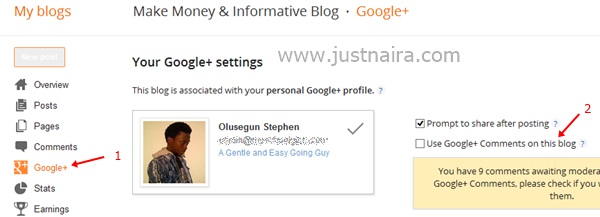
  1. Sign in to your Blogger Account and click on the blog you want to include/exclude the Google plus comments box.
  2. Click on Google + link, and then check the box to enable or uncheck the box to disable it by clicking on the Use Google+ Comments on this blog box. See the image below:


Baca Selengkapnya ....

How to Write Title Tags for Your Web Pages

Posted by Unknown Sabtu, 19 Oktober 2013 0 komentar
By: Donald Nelson

I have actually been searching for this very topic to help my readers out, after i stumbled upon the article i decided to publish it on this blog as it had really helped me in time past and still indeed helping me real big time. When it comes to search engine optimization, the single most important sentence that you will write for your website is the title tag of your main page. If you write it properly then you will have taken a big step towards getting your site well placed in search engine queries for your important keywords.

Before I give you a step-by-step guide to writing title tags, let's define what they actually are and see why they are important. When you look at a web page in your browser, the writing in the blue strip above browser's commands (file, edit, view, etc.) is the title tag. On your actual html document the title tag is in the head portion between the notation <title> and </title>.


  The title tag is important because it "tells" the search engine what the page is about, and in the case of your main page, what your website is all about. I remember back in my school days that we used to take standardized examinations in which we had to read a story and then answer the question: "What would be the best title for this essay?" Choosing a title tag is something like answering this kind of question. You've got to pick out the gist of your enterprise and highlight it in a sentence. So, take a look at your web page and get ready to begin, following these steps:

1. Make sure your three or four most important keywords or keyword phrases appear in the title tag. The most important words should appear near the beginning of the sentence, and they can be repeated within the sentence for added emphasis. For example, if I am offering low-cost web design, then my title tag might look like this: <title>Web Design: Affordable, Low Cost Web Design from the Acme Web Design Company</title>

2. Leave your branding and sales pitch for another part of the web page. Although it is a natural tendency to want to put your company name at the beginning of the title tag, you should remember that unless you are very famous like Coca Cola, people are not searching for you. So, put your most important keywords at the front of the title tag, and establish your brand name with your logo and other elements of the web page. If your company name includes your keywords, like our hypothetical Acme Web Design Company, then put it in the title tag, but not necessarily at the beginning.
Similarly, the title tag is no place for your sales pitch, so keep out flowery or extraneous adjectives, unless they are actual terms used in searches for your product or service.

3. Place your geographical or niche-defining term in your title tag. If you are trying for a top ten or top twenty position for a term such as "web design," then you are really in for a difficult struggle. However, suppose the Acme Web Design Company is located in Columbus, Ohio. Then instead of attempting the almost impossible task of getting the top rankings for the term "web design," it would be far better to get a high ranking in the geographical niche using a title tag such "Web Design, Columbus, Ohio: Low Cost Web Design in Columbus, Ohio by The Acme Web Design Company"


4. The title tag can be longer than you think. Some guidelines say that the title tag should be no longer than 70 characters. It is true that only the first 70 characters will show in the top bar of the browser, but search engine robots will read the rest of the tag and the search engines will not penalize you for going over the 70 character mark. Take a look at highly ranked sites in heavily competitive categories and you will see examples of long title tags. Write the tag according to your need to get your important words and phrases included in a sentence that best describes what your product or service is about.

5. Vary the title tags on the inner pages of your website. Even with a long title tag, it is not possible to highlight all the possible terms which someone might use to find your website. This is not a problem if you make use of the other pages of your website. Instead of simply having a title tag that says "services" our web design firm could highlight "low cost, web design services" on that page. The "contact" page could be used to emphasize the geographical location once again, and so on. Many websites make the mistake of repeating the same title tag on each of the inner pages of the site. Avoid this and use each of your page's titles to target important keywords and keyword phrases.

So, take a look at your website's title tags, and see if you can improve them. The effort that you make will be well rewarded.

Baca Selengkapnya ....

6 Dosa Besar Google Terhadap Bangsa Indonesia Tapi Tak Pernah Kita Sadari

Posted by Unknown Jumat, 18 Oktober 2013 0 komentar


Ada sebuah pertanyaan besar yang ada di benak saya setelah melihat perkembangan internet akhir-akhir ini. Rupanya pertanyaan yang sama juga ada di benak European Commission (EU) dan Federal Trade Commission (US) bahkan oleh Texas Attorney General. Apakah Google memonopoli internet?

Google CEO Eric Schmidt said this in 2009: “If you have something that you don’t want anyone to know, maybe you shouldn’t be doing it in the first place.”
Google, yang pemberkasan domainnya dilansir pada tanggal 4 September 1998, mengklaim bahwa tidak ada praktik monopoli sama sekali di bisnisnya. Walaupun demikian, secara khusus, Google mengatakan bahwa sedang berlangsung review tentang beberapa bisnisnya, termasuk DoubleClick, Admob dan ITA Software.

Masih fresh ketika dahulu, bulan April 2008, dunia digegerkan dengan rencana penggabungan Google dan Yahoo! Inc. Kalau itu benar terjadi, tak pelak akan ada monopoli besar di search engine dan sistem pemasarannya. Ini jelas bahaya karena perputaran uang di search engine akan berkutat di dua perusahaan terbesar ini. Untung gak jadi. Persis tiga jam sebelum Deparment of Justice-nya Amerika memasukkan gugatan, dealnya batal.

Sampai dengan saat ini, banyak gugatan yang mengarah ke Google dan berbagai perusahaan besar internet lainnya, seperti Facebook misalnya. Semuanya berkutat di permasalahan penggunaan data pengguna. Bahkan secara terang-terangan Facebook meng-email semua penggunanya untuk mempergunakan photo-photo untuk kepentingan bisnis Facebook. Karena kejadian ini Facebook banyak di protes penggunanya. Hell no!

Yang paling gres dari Google adalah, beberapa hari yang lalu, pengacara perusahaan ini mengajukan permohonan untuk dapat membaca email dari setiap akun GMail. Yes, Google akan membaca isi setiap email yang kita kirim melalui sistem mereka. Alesannya simpel, sedikit naif juga menurut saya : “Scanning email is simply part of the business”. Whatt??

Wait. Mungkin ada benernya juga. Disetiap akun Gmail ada text-ads yang selalu muncul. Berawal dari sini, Google ‘maksa’ ingin membaca email kita. Keahlian algoritma Google yang membaca kata, tentu saja akan sangat berguna apabila bisa mendeteksi setiap kata di dalam email dan kemudian mengirimkan setiap iklan yang berhubungan dengan kata-kata tersebut. Boom! hasilnya tentu saja menjadi bentuk iklan yang sangat-sangat targeted. Masalahnya adalah, apakah akan berhenti sampai disitu saja. Wallahualam.

Walaupun sudah bersusah payah untuk menangkis berita dari Edward Snowden, mata-mata yang membocorkan rahasia Amerika ke publik, yang mengatakan bahwa Google adalah salah satu perusahaan yang membocorkan data penggunanya ke NSA melalui PRISM Program. PRISM adalah nama kode untuk program pengumpulan data via internet yang didukung oleh Protect America Act. Awalnya, program ini dipakai untuk mencegah terorisme dengan membuka data dan akses ke setiap akun yang dicurigai oleh National Security Agency (NSA) akan membahayakan bagi Amerika. Perusahaan besar yang berpartisipasi dalam program ini adalah : Microsoft, Yahoo, Google, Facebook, PalTalk, YouTube, Skype, AOL dan Apple. Terakhir, Dropbox pun disebut akan join. Tentu saja, semua perusahaan ini membantah dengan keras keterlibatan mereka dalam PRISM.

Apapun itu, Google adalah raksasa besar. Karena besar berarti patut untuk sombong. Hanya saja, kesombongan itu tidak berarti di China. Entah kenapa, sekarang saya jadi mengerti mengapa Cnina menolak mentah-mentah Google dan men-support habis search engine domestik : Baidu. Tindakan yang dahulu dikecam banyak orang dunia, karena menghalangi globalisasi informasi katanya, sekarang menuai pujian. Hanya dengan keberanian semacam inilah, sebuah bangsa akan berdaulat besar. Kekuatan perusahaan global, yang didukung oleh Amerika, kemudian masuk menembus batas investasi dan ruang private, wajib dicurigai. Sayangnya negara kita tercinta ini masih malu-malu apabila berhubungan dengan perusahaan luar negeri. Lihat saja berapa banyak hasil alam kita yang dibawa ke luar negeri, oleh perusahaan luar negeri. Akankah, hasil intelektual kita termasuk pemikiran dan teknologi, akan dikuasai oleh perusahaan asing juga? Betulkan Google sedemikian murah hati untuk memasang muka manis dengan Pemerintah Indonesia? Ini adalah dosa besar yang sudah dan akan diperbuat Google terhadap bangsa ini.


1. Sebelum Membeli Android, Ini Harus Tahu

Setiap kali pertama kali kita mengaktifkan smartphone android, akan ada notifikasi agar memasukkan akun Google kita. Saya baru menyadari ini sedikit janggal ketika sadar bahwa akun tersebut tidak akan pernah tertutup selama kita memakai android yang sama. Artinya, semua bisnis Google : Search Engine, Video: YouTube, Maps, Gmail dan Chrome termasuk Google CheckOut (sekarang Google wallet) akan terus berada dalam posisi ‘on’. Here’s the problem : ketik kata ‘email’ maka kita akan diarahkan ke Gmail, padahal Gmail adalah layanan email yang ketiga terbesar di dunia. Yang pertama adalah YahooMail. Termasuk ketika kita ketik kata ‘analytic’ atau ‘translate’, tebak apa yang keluar pertama kali. Pencarian anda di Android tidak akan pernah fair. Google-lah yang berkuasa dan ini tidak pernah dikomunikasikan ke publik.

2. Google Maps : Intelejen atas nama Peta


Saya pernah posting di Bixbux ini tentang bagaimana Google Maps bisa sangat membahayakan. Ini sungguh terjadi. Dengan leluasa Google bisa mendeteksi dimana kita berada. Pejabat tinggi negara, lokasi instalasi militer sampai dengan lokasi rahasia akan terkuak dengan mudah. Jangan lupa, berdasarkan undang-undang kita, peta dasar sebuah wilayah hanya bisa disediakan oleh negara. Google sudah melanggar ini dengan menyediakan peta dasar setiap inchi ibu pertiwi. Pertanyaan : apakah anda yakin Google gak bisa liat berapa banyak tank atau pesawat kita yang diparkir di outdoor? Atau berapa banyak anggota militer kita dengan mengidentifikasi berapa banyak markas/barak militer yang kita punyai? Bagaimana dengan istana negara, yakinkah kalau presiden kita terbebas dari ancaman? Secara keluar masuknya kendaraan di istana negara dapat diketahui Google secara real time?

3. Adsense Publisher Indonesia? Banned!


Saya tidak menyalahkan Google karena banyak mem-banned akun adsense dari publisher asal Indonesia. Banyak banget sekarang penyedia layanan ads, baik itu ads-network atau traffic source company, yang menolak publisher dari Indonesia hanya karena banyaknya ‘fraud’ yang dilakukan. Yang tidak boleh dilupakan adalah : Google pun mencari uang di Indonesia. Pemasang iklan di Google dari Indonesia bisa dikatakan sangat potensial. Ketakutan Google ini ditandai dengan dibukanya kantor Google secara diam-diam. Sempat ada kontroversi apakah perlu Google memasang server di Indonesia, tetapi lambat laun berita itu senyap karena Google meng-klaim hanya mengaktifkan biro iklannya saja di Jakarta. Mau biro iklan atau apapun itu, uang dari advertiser asal Indonesia tetap saja ditarik mulus ke Singapore (kantor Google ada disana) sebelum dilarikan dengan senyuman ke Amerika.
Kalau perusahaan sebesar ini selalu menyalahkan Publishernya dan mendewakan Advertiser, terus mengapa setiap dollar dari akun yang ter-banned, yang selalu dibilang akan dikembalikan ke pemasang iklan (advertiser) tidak pernah terjadi. Kejadian ini pernah ditelusuri oleh rekan saya, Harrison Gervitz, yang akun adsense-nya dibanned, tetapi uangnya tidak pernah kembali ke advertiser (Harrison juga pemasang iklan di Google, pemegang akun premium Adwords).

4. Menguasai Pasar Indonesia dari Luar


Mengapa pemerintah Indonesia begitu tunduk terhadap Google? Jawabannya cuma satu : karena rakyat kita begitu bangga dengan produk yang mendunia. Lihat saja betapa orang kita sangat bangga berkenalan dengan orang-orang Google. Atau ketika terlibat dalam berbagai acara yang diselenggarakan oleh Google. They are not a God. Mereka adalah penguasa pasar search engine di Indonesia. Adakah search engine lokal yang sering kita pakai? No, gak ada. Terus kenapa tidak ada program pemerintah untuk memakai produk lokal, bahkan dalam kita berinternet? Jutaan traffic dari Indonesia saat ini betul-betul dikuasai oleh berbagai perusahaan luar negeri, dari luar negeri dan tidak ada perlindungan sama sekali dari pemerintah lokal. Apabila ada dispute, undang-undang ynag dipakai tentu saja undang-undang dimana kantor Google itu berada. Undang-undang Indonesia? Maaf ya, gak akan dipake, kecuali yang mengatur iklan digital. Eh, emang ada ya?

5. Google Play? Developer Indonesia Harap Menyingkir

Ini sangat riil. Tidak seperti Apple, Google tidak memperbolehkan developer aplikasi asal Indonesia, yang tinggal di Indonesia dengan akun bank Indonesia untuk ‘mencari uang’ di pasar aplikasi Android miliknya: Google Play. Bandingkan dengan berapa banyaknya pengguna Android di Indonesia. Di tahun 2011 saja, pengiriman smartphone Android ke Indonesia tumbuh 22 persen secara berurutan. Secara global, 48 miliar aplikasi Android yang sudah diinstal dan 2.5 miliar terakhir didapat hanya dalam kurun waktu 4 bulan saja. Untuk itu Google juga mengakui bahwa kini pendapatan mereka lebih banyak dari Google Play Store dibanding tahun lalu dan pendapatan per penggunaan juga meningkat 2.5 kali. Hal tersebut diungkap dalam acara Google I/O 2013 yang diselenggarakan diMoscone Center West, San Fransisco pada bulan Mei 2013. Jadi, operating systemnya masuk ke Indonesia (90% melalui handset Samsung), aplikasinya banyak diunduh orang Indonesia, tetapi orang Indonesia, yang tinggal di bumi pertiwi, dengan akun bank lokal, tidak diperbolehkan menjual aplikasi berbayar di Google Play. Dimana keadilan?

6. There ain’t no such thing as a free lunch!


Artinya : gak ada itu namanya makan siang gratis, semua ada timal baliknya. Oke, Google di Indonesia mempunyai program Bisnis Lokal Go Online. Salah satu programnya adalah menyediakan domain dan hosting gratis untuk 100.000 pengusaha kecil yang akan menggarap pasar online. Secara khusus disebutkan, saat ini hanya ada 75.000 UKM dari 17 juta UKM yang memiliki website sendiri. Santa claus? Wait, tunggu dulu. Bantuan lain dari program ini adalah Bantuan dari Google ini secara lebih rinci yaitu: (1) Gratis domain “.co.id” untuk satu tahun pertama setelah pendaftaran. Untuk tahun berikutnya peserta UKM akan dikenakan biaya maksimal Rp 150.000 per tahun, (2) Gratis konsultasi dan edukasi bisnis yang berkelanjutan, (3) Gratis iklan online dan terdaftar di Google Maps, (4) Kupon AdWords bernilai Rp 500.000 untuk 100.000 pendaftar pertama yang telah mengaktifkan situs mereka dan memiliki akun di AdWords. Hhmm..tiga dari empat poin di atas memakai kata gratis. Oke, tetap saja gak akan gratis selamanya, tetapi kita semua tahu, mempunyai website saja tidaklah cukup bagi sebuah perusahaan. Perjuangan untuk mendapatkan ranking pertama di search engine itu yang justru menarik. Akankah Google memberikan insentif posisi hasil search engine? Kecuali produk Amazon (karena 3 board director-nya Google dulunya dari Amazon, bahkan Amazon konon mempunyai integrasi platform ads PPC yang khusus dr Google), jangan harap Google akan mengulurkan tangan. Kapitalis bernama Google ini akan terus menarik setiap rupiah yang kita punya ke luar negeri.

Terus terang, saya bukan antipati terhadap Google. Tetapi rasanya memang perusahaan ini perlu penyeimbang yang sebanding. Investasinya dipajak lebih banyak kek, atau harus bersikap ramah terhadap bangsa ini. Entah kenapa saya mempunyai keyakinan, kalau presiden kita masih Soekarno, tidak akan harkat dan martabat bangsa ini diinjak sedemikian dalam oleh perusahaan luar negeri. Sedih, tapi kita akan selalu diposisi yang kalah oleh Google. Gak percaya, yuk kita ‘googling’ lagi aja, daripada mikir yang beginian.

Baca Selengkapnya ....

Google Maps For iOS Gets Faster

Posted by Unknown Selasa, 15 Oktober 2013 0 komentar
Google today updated its Maps app for iOS with new features and support for the Arabic and Hebrew languages. You can download the new version now directly from Apple’s App Store.

The biggest improvement is that accessing navigation is now faster and you can also expect faster and more accurate re-routing. The added route and traffic overview should also be helpful, especially when you’re driving.

The new tips and tricks section is only really for those who don’t consider themselves power users. Nevertheless, you may want to flip through it to see what you find.

Here’s the full Google Maps 2.3.4 for iOS change-log:


  • Faster access to navigation, complete with route and traffic overview.
  • Tips and Tricks available in the side menu.
  • Arabic and Hebrew now supported, including voice guidance in navigation, where available.
  • Bug fixes.
This appears to be a minor update, and we’re not just saying that because the version number has barely budged. The first two additions are relatively minor, and they were added to Google Maps for Android back in September. That being said, the third point is obviously a big deal in the Middle East.

Google is likely working on bringing the latest Maps features on the desktop (see below) to both Android and iOS. We’ll keep you posted when that arrives.

Baca Selengkapnya ....

Google Knows Nearly Every Wi-Fi Password In The World

Posted by Unknown Sabtu, 14 September 2013 0 komentar

Sounds like a James Bond movie. Right?

If an Android device (phone or tablet) has ever logged on to a particular Wi-Fi network, then Google probably knows the Wi-Fi password. Considering how many Android devices there are, it is likely that Google can access most Wi-Fi passwords worldwide.

Recently IDC reported that 187 million Android phones were shipped in the second quarter of this year. That multiplies out to 748 million phones in 2013, a figure that does not include Android tablets.

Many (probably most) of these Android phones and tablets are phoning home to Google, backing up Wi-Fi passwords along with other assorted settings. And, although they have never said so directly, it is obvious that Google can read the passwords.
 Click Here to read full article.

Baca Selengkapnya ....

Nonton Tv Bersama / Tv Online

Posted by Unknown Rabu, 23 Januari 2013 0 komentar

Enjoy Your Cinema


Baca Selengkapnya ....

Facebook will Make Search

Posted by Unknown Jumat, 18 Januari 2013 0 komentar

Facebook Make Search engines Themselves-different from the rumors and speculations that circulated, apparently what is meant by the ' mysterious ' event is the release of the Facebook Graph Search.

Finally, Facebook opening mysterious events surrounding the ' card ' them. Facebook released a new product called the Facebook Graph Search on this day (16/01 – Indonesia time or 15/01 – United States time).

As reported by the Guardian newspaper (15/01), Facebook Graph Search is the first major product since the company held ITS IPO in may 2012.

"Graph Search is a new way for Facebook users or others who want to get information about everything on Facebook," explained Mark Zuckerberg when he refers to press release in Menlo Park on Tuesday (15/01 – time Indonesia).

With the launch of this new product, then any Facebook user can find information about people, places, photos, Favorites and everything contained in Facebook with ease.

Of course, the rise of search engines it will be a serious threat to Google. Willing or not Facebook Graph Search Agent Google in the future?

The article on Facebook to create its own Search Engine. it May increase your knowledge


Baca Selengkapnya ....

Cara Pasang TV di Blog

Posted by Unknown Kamis, 17 Januari 2013 0 komentar
Sebenarnya Saya nggak suka dengan kebanyakan acara TV Indonesia.

Soalnya begini bayangin aja Gan, sinetronnya lebay. Reality Shownya cuma skenario nggak real. Kuisnya juga bohongan menipu. Apalagi kuis yang daftarnya pake acara registrasi ketik *#08....sekian...sekian....

Acara musik ?? MC nya pada nggak ngerti musik. Udah gitu sekarang banyak banget boyband. Harusnya yang di banyakin itu Girlband. Bikin seger mata...


Paling yang bagus cuma acara berita doank. Hehe. Ya udah daripada kelamaan mending Agan langsung pasang script TV Online dari MIVO berikut ini. Di dalamnya terdapat 10 lebih saluran TV.

<div style="border-left: 5px solid #000; border-right: 5px solid #000; height: 555px; overflow: hidden; width: 490px;">
<div style="margin-left: -10px; margin-top: -227px;">
<object align="top" classid="clsid:d27cdb6e-ae6d-11cf-96b8-444553540000" codebase="http://www.macromedia.com/go/getflashplayer,0,0,0" height="782" id="MivoTV" width="550"><param name="wmode" value="transparent">


<param name="allowScriptAccess" value="always">


<param name="allowFullScreen" value="true">


<param name="SeamlessTabbing" value="false">


<param name="movie" value="http://id.imediabiz.com/MivoTV.swf?r50000">


<param name="quality" value="high">


<param name="scale" value="noscale">


<param name="menu" value="true">


<param name="devicefont" value="false">


<param name="bgcolor" value="#000">


<param name="name" value="MivoTV">


<embed src="http://id.imediabiz.com/MivoTV.swf?r50000" quality="high" scale="noscale" bgcolor="#000" width="550" height="782" name="MivoTV" align="top" allowscriptaccess="always" allowfullscreen="true" type="application/x-shockwave-flash" pluginspage="http://www.macromedia.com/go/getflashplayer" wmode="transparent" menu="true" devicefont="false"></object></div>
</div>
</div>
<a href="http://piss-blogger.blogspot.com/2012/01/pasang-mivo-tv-di-blog-mu-tv-online.html" target="_blank"><img alt="tutorial blogger Indonesia" src="http://i827.photobucket.com/albums/zz194/depalpiss/favicon/widget_depalpiss21.png" style="margin: -3px 0 0 0;" width="70px" /></a><br />
<div style="text-align: center;">
<br /></div>

Happy blogging Gan...


Baca Selengkapnya ....

How to Submit Blog link into search engine at once time?

Posted by Unknown 0 komentar

Google
Today, I wanna post about How to Submit Blog link into search engine at once time As you know, Google is the largest search engine in the world today. But in blogging, not enough if we only register the blog to 1-2 engine only.

What if directly to 50 search engines at once? it Can.


1. Please visit this site. http://freewebsubmission.com/

2. You scroll down. Then fill out the form there.
[+]Website URL: enter the URL. Example = http://alvincelebration.com/
[+]Name: enter the name of the blog. Example = Alvin Celebration
[+]Email: enter your email
[+]Tick the "I Agree to the terms".
[+]Click The "Submit Your Site".

3. open the email. Check the inbox of freewebsubmission
__ And then click the confirmation link.

4. click "Submit Your Site". Finish.

Thanks For Visiting my site Dude

Baca Selengkapnya ....
Trik SEO Terbaru support Online Shop Baju Wanita - Original design by Bamz | Copyright of Android rush.