Tampilkan postingan dengan label facebook. Tampilkan semua postingan

Baseball Heroes Hack Combo Update 2013 New

Posted by Unknown Jumat, 08 November 2013 0 komentar
Alvin Crew - Going to share one of a new Cheats of Facebook named Baseball Heroes  in this article you will see the tutorial how to eneble Baseball Heroes Cheat
Baseball Heroes Hack Combo Update 2013Baseball Heroes Hack Combo and Home Run ComboMax. The latest update made ​​N3 BBH Trainer. Baseball Heroes ComboMax Hack New Update. This cheat function to make the combo bar is always filled permanently.

Baseball Heroes Hack Combo Update Sunday, November 10, 2013. Update trainer BBH32v456
Features:


- Bypass (must be activated)
- Permanent Combo (after max combo then you can not be lost max combo for the next game, unless you do the refresh game)
- +1 Max Combo (enough to 1 combo point, it will be a combo max)
- Swing automatically (Automatic Hit)


The tools used for Baseball Heroes Hack Combo :

  1. Cheat Engine 6.1 or 6.2 (recommended CE 6.2)

    Free Download Cheat Engine
  2. Free Download BBH32v456

    Free Download BBH Trainer 32-bit

    Free Download BBH Trainer 64-bit
  3. Your Browser ( Google Chrome , Mozilla Firefox )

Steps to run the Baseball Heroes Trainer :

  1. Download and Install Cheat Engine
  2. Download BBH Trainer (Update October 17)
  3. Log into your facebook account and Baseball Heroes game (After entering do not directly playing or click anything)
  4. Open Trainer BBH made ​​N3, then select the browser you are using
  5. The next step after you have selected the browser is enable all the hack list contained in the Trainer
  6. Back to Baseball Heroes game and Greetings HOME RUN!!! and Taste the Unlimited HOMERUN
Please Kindly to Read The King of Tower Cheat too in order to help this website to updating any cheat

Baca Selengkapnya ....

The King Of Tower Super Hack Update 2013

Posted by Unknown 0 komentar
Alvin Crew - Going to share one of a new Cheats of Facebook named The King Of Tower in this article you will see the tutorial how to eneble The King of Tower Cheat
The+King+Of+Tower+Super+Hack+Update+TORI+InfogameThe King Of Tower Super Hack Update - This cheat is useful to make your tower, heroes and army invincible so you will be easily to defeat all your enemies. also You can download this trainer for free, and there's no password and survey.
The King Of Tower Super Hack Update ‎‎Sunday, ‎November ‎10, ‎2013. Update The King Of Tower Trainer Version 6 (TKOT V6), see the date on the trainer.

Play Game: The King Of Tower on facebook: https://apps.facebook.com/thekingoftowers/

Feature: Super Tower, Super Soldier and Super Hero
NOTE: If this cheat does not work please comment, I will try to update it as soon as possible.

Tools Required:

  1. Cheat Engine :

    Free Download Cheat Engine

  2. The King Of Tower Trainer - TKOT V6 (Free Download, no password and no survey)

    Free Download TKOT V6 32-bit :

    Free Download TKOT V6 64-bit

  3. Your Browser
Steps to use this trainer:
  1. Download and Instal Cheat Engine
  2. Download The King Of Tower Trainer
  3. Log in to your facebook account and Play The King Of Tower (don't click anything)
  4. Open Trainer, select your browser then click select button.
  5. Then enable all hack
  6. After that, play The King Of Tower
  7. Video tutorial: 


Baca Selengkapnya ....

Facebook Messenger App Redesigned

Posted by Unknown Rabu, 30 Oktober 2013 0 komentar
Photo Credit: TheVerge.com
The new Messenger has largely the same functionality as its predecessors, but features a brand new design meant to emphasize its distance from the main Facebook app. Most importantly, friends' avatars are now circular, and have a little badge on them if a friend is using the Messenger app. In other words, it's instantly clear if a friend you're chatting with is using Facebook Chat on the web, or has the Messenger app on their phone and will receive your chats instantly. This distinction is part of what makes apps like WhatsApp compelling. WhatsApp isn't hooked in to any social network, and there's no ambiguity about how you're chatting with a friend.

"This is a refresh of the Messenger brand," says designer Luke Woods, which focuses not just on "mobile to mobile" but on fitting in with iOS and Android and their respective conventions, like the Send button. The previous version of Messenger, Woods says, was an iOS app visually ported to Android. Before that, Facebook for mobile devices was built using HTML 5 for no platform in particular, but Facebook ditched that plan long ago.

In terms of functionality, there are a host of under-the-hood improvements to make sending and receiving messages faster, says product manager Peter Martinazzi. There are also some front-end tweaks that makes the app faster — especially on Android, where the SMS texting feature, which let you text friends who don't have Facebook, has been removed. "We made a big deal about the SMS feature and it just didn't take off," said a Facebook spokesperson. Removing the ability to send SMS texts from within Facebook Messenger is an interesting move, especially considering KitKat, the next version of Android launching soon, will let users pick their own default SMS app. KitKat would provide Facebook with one more place to insert itself into your digital life, and rumor has it Google plans to make its Hangouts messaging app the default SMS app in Google Play devices like the HTC One and Samsung Galaxy S4.


While Facebook won't let you text a phone number from Messenger, the company plans to use phone numbers in a new way to identify its users, just like in WhatsApp. Upon opening Messenger for the first time, it will ask you to provide your phone number. Then, the app can match you with people whose numbers you have, but whom you aren't Facebook friends with. Facebook guarantees your messages will reach somebody's inbox if you have their phone number. "The Facebook friend graph is an important graph for you, but everyone also has a phone graph," says Martinazzi. "These are the people who you aren't Facebook friends with, but you have their phone number, like a classmate or coworker." While Facebook has abandoned its plans to replace your texting app wholesale, it's more dedicated than ever to becoming your de facto messaging app.

The messaging wars are hotter and more fragmented than ever. By cutting visual ties between its messaging experience and its main app, Facebook hopes to get its horse back in the race — because features have never been the problem. If anything, the problem has been branding.
Source: TheVerge

Add TechzDot on BBM: 25C037D0
For Trending Updates At Your Finger Tips
If you have any questions or suggestions feel free to drop your comment in the comment box below.

Baca Selengkapnya ....

Why Blogging Is a Long Term Money Maker

Posted by Unknown Selasa, 15 Oktober 2013 0 komentar
Over time, the blog will overtake the income made by Twitter and Email. A blog post has a much longer lifespan and can be indexed by a search engine and therefore receive traffic for months, even years, after the post has been written. By comparison, very few people will ever check someone’s Twitter history and all the emails I’ve sent out about the Footer Ad have been deleted by now.

Your blog is your foundation. However, to maximum its income, you need to add support systems like Twitter and Email. If all I had was the blog post for this promotion, I would have missed out on more than 2/3 of the income I could have made in the first 24 hours.
You might also like >>

How To Write A Keyword Rich Blog Post


You should continue working on your blog but you should also work on developing your Twitter community and newsletter subscriptions. If all you have is a blog, you’re leaving a lot of money on the table.
By John Chow.

Baca Selengkapnya ....

My Ninja Coin Hack Permanent English Version

Posted by Unknown Sabtu, 05 Oktober 2013 0 komentar
My Ninja Ninja Coin Hack permanent English Version - With This Cheat you can get many free coins, coin we get permanent.This Cheat works 100%, if you need proof take a look at the tutorial videos at the end of this post! Very Bottom.


Tools needed:
The steps:
  1. Download and install Cheat Engine
  2. Login to your facebook account and then play ninja I
  3. After you log in to my ninja, open your bag then goes to the market
  4. Then open Cheat Engine Select >> process browser (Firefox FlashPlayerPlugin) and chrome to Google chrome >> value type is 4 bytes
  5. The next step is to look at the video below:


 If The Cheat Work! Please Spread My Blog to others Through Facebook or Twitter!
Thank You!

Baca Selengkapnya ....

My Ninja Ninja Koin Hack Permanen Indonesia Version

Posted by Unknown 0 komentar
My Ninja Ninja Koin Hack Permanen Indonesia Version - Dengan Cheat ini Anda bisa mendapatkan banyak gratis koin, koin yang kita dapatkan permanen. Cheat ini bekerja 100%, jika Anda memerlukan bukti Lihatlah tutorial video di akhir posting ini! Paling Bawah.


Alat-alat yang diperlukan:
Langkah-langkah:
  1. Download dan instal Cheat Engine
  2. Login ke akun facebook Anda kemudian bermain My Ninja
  3. Setelah Anda log in ke ninja saya, membuka tas Anda kemudian pergi ke pasar
  4. Kemudian buka Cheat Engine >> Pilih proses browser (FlashPlayerPlugin untuk Firefox) dan chrome.exe untuk Google chrome >> jenis nilai adalah 4 byte
  5. Untuk langkah berikutnya Lihat video di bawah ini:

Apabila Cheat Work! Mohon Sebarkan Blog Saya ini ke Orang Lain Melewati Facebook atau Twitter!
Terimakasih!

Baca Selengkapnya ....

Top 5 Ways To Hack A Facebook Account

Posted by Unknown Jumat, 13 September 2013 0 komentar
By Abhishek kumar 

1. Hacking Facebook Account by Phishing : 

Phishing is one of the most common hacking technique used by both Professional hackers and newbies. In fact hacking Facebook with phishing Attacks have a very higher rate of success and depends on the skill of the Hacker.

In basic phishing Attack, Hacker creates a fake Login page of Facebook which seems exactly the same as real Facebook login Page. the hacker then trys to convey the victim to login into his account through the fake login page, once victims enters his Facebook login id and enters the login button. his username and password are saved in a text format on the server, hacker then can have access to the username and password by downloading the file.


2. Hacking Facebook Account with Session Hijacking:

Hacking Facebook Account with Session Hijacking is another Successful method, though it needs Basic ideas about how to use the tool required for the Attack.
A attacker can use variety of methods to hack the victim, depending upon the type of network he is on.

If the victim is on hub based network, hacker can sniff traffic with any pocket sniffer and then gain access to victim's cookie to login into the Facebook Account.
If the Hacker is on Switch based network he can Hack victims account by ARP poisoning request. and in case both hacker and victim are on same wireless network hacker can use simple tools like Firesheep to gain access to authentication cookie and hack the account.


3. Hacking Facebook by Session Hijacking with Firesheep:

Hacking Facebook Accounts with Firesheep, uses the process of Session hijacking and cookie stealing.
Firesheep is one of the most downloaded firefox extension, and have been used to hack millions of Facebook, twitter and email accounts till now.

Firesheep uses a packet sniffer to intercept the unencrypted cookies. this tool works if the victim and hacker is connected to same wifi Network.

When the Firesheep is activated, Attacker is able to see different pre-authenticated session on the right side bar of Firefox. the hacker can then select the account to which he wants to login and finally get access to Facebook Account.


4.Hacking Facebook with a Pendrive using password stealer:

This method works, if Attacker have access on Victims computer.
Most of the peoples save their cookies and password in their browser for saving the time to log in again and again. if the Attacker have access to victims computer he can use the password using a pendrive and password stealer by simply inserting the pendrive and running the program to extract the password from browser into the Pendrive.

Though it is not widely used, but is one of the finest method to hack Facebook or any other Account.


5. Hacking Facebook with Keylogging:

Hacking Facebook with Keylogging is Another successful method to hack any account, the process requires, keyloggers, softwares that works as an spy over victims Computer.

Once a Keylogger is installed in victims computer, hacker can have access to every single key stroke from the victims computer. directly sent to him by ftp server or through emails. Now every single keystroke will surely contain the Facebook username and password.
The main trouble with keyloggers are that most of the time they are discovered as virus from Antivirus program.

It is only the basic ideas about How to hack any Facebook account. The Complete Methods using the mentioned process will be described in upcoming post.

Baca Selengkapnya ....
Facebook's Mark Zuckerberg Is Hacked

Posted by Unknown Selasa, 20 Agustus 2013 0 komentar

Source: 360Hackers Group.
 Khalil, a Palestinian white hat hacker, submitted bug reports to Facebook about a vulnerability that allowed him to post on anyone's wall. But Facebook's security team didn't do anything. So Khalil wrote on Mark Zuckerberg's wall about it and was generally a badass.
Khalil explains on his blog that he submitted a full description of the bug, plus follow-up proof of its existence to the Facebook security feedback page, where researchers can win rewards of at least $500 for finding significant vulnerabilities. Then he submitted again. The second time he got an e-mail back that said, "I am sorry this is not a bug."

When he posted on Zuckerberg's wall, Khalil said, "First sorry for breaking your privacy and post to your wall , i has no other choice to make after all the reports i sent to Facebook team ." He then detailed the situation and provided links.

Within minutes, a Facebook engineer contacted Khalil for more information and then blocked his account "as a precaution" while a security team fixed the bug. Later his account was re-enabled. But Facebook says that he cannot claim a reward for the find because in hacking Zuck's wall he violated Facebook's terms of service. They commented that, "exploiting bugs to impact real users is not acceptable behavior for a white hat. In this case, the researcher used the bug he discovered to post on the timelines of multiple users without their consent." Facebook admits, though, that its team should have been more diligent in following up on Khalil's submission. So. Cool. Problem solved.

Baca Selengkapnya ....

How to Merge Profile Picture and Cover Pic on Facebook

Posted by Unknown 0 komentar

Go to the website and click on Merge profile & Cover photo.
The Website will ask you to upload a picture [Upload the picture that you want to merge]

After uploading the picture, select the part of the picture to your cover picture and click on DONE.

Then Click on the LIKE button of tricked out timeline or click on Already liked us?

Website will provide your profile picture and cover picture.

Baca Selengkapnya ....

Cheat Gold Perjuangan Semut Terbaru 2013

Posted by Unknown Jumat, 12 Juli 2013 0 komentar
https://blogger.googleusercontent.com/img/b/R29vZ2xl/AVvXsEhKgkNVsB_-jqoyNCiQYpVHAZjNMIlWpvFZe5a3Cu-LfBiCj-PZWT9VXDfwXdnmG0s3zpxvlqe7yMOx3KJJiXZSC32NrfPwuX3JeGHXuBlKcJ5L5SO74eWBSytFLiYkyarFGTx1q1iKCvSD/s400/cover2.jpg 
Alvin's Crew - Selamat pagi sobat,pasti udah gak heran lagi dengan Game yang namanya Perjuangan Semut kan? Tentunya seperti judul posting Di Atas pada pagi ini ini saya akan share Cheatnya!
Mau tau Bagaimana Cara mengaktifkan cheat tersebut?
Okey,Ikuti Langkah - Langkah di Bawah Ini :

Tools:
  1. Cheat Engine : 
  2. Browser anda (lebih baik menggunakan Mozilla Firefox atau Google Chrome)
Cara kerja Hack Gold Permanent :
  1. Download dan Instal Cheat Engine (bagi yang belum punya).
  2. Buka Cheat Engine.
  3. Buka game Perjuangan Semut.
  4. Beli formula buat melebur 5 atau 7 buah saja.
  5. Scan jumlah formula anda.
  6. Jual 1 trus scan jumlah formula mu sekarang.
  7. Ulangi cara 6 sampai ketemu 1 addres.
  8. Ganti addres menjadi 30000 (coins anda 3jt)
  9. Jual semua formula tersebut
  10. Selesai.
 Bagaimana? Sangat mudah kan?
Apabila sobat mengalami kekeliruan bahwa cheat Tidak Work Silahkan Comment di bawah.


Baca Selengkapnya ....

Facebook rolling out Graph Search to US users this week

Posted by Unknown Senin, 08 Juli 2013 0 komentar

 Mark Zuckerberg and his facebook team won't stop just amazing us.

Remember that profile-specific social network search tool Mark Zuckerberg announced back in January? It's finally ready for the general public. According to the New York Times and ABC News, Facebook Graph Search will start rolling out to US users this Monday. The update is more than a simple search bar revamp, however -- it allows users to mine their social circle for very specific information, asking questions like "Who are my friends in San Francisco," or searching for "people who went to Stanford who like the 49ers." The tool is designed to harken back to the company's original goal of connecting people, and aims to help users draw lines between their friends and interests. Graph Search will also pull select data from Bing, allowing users to peek at the weather from the comfort of their timeline.

Despite launching on a wider scale, the service isn't perfect -- the New York Times reports that it still has trouble juggling synonymous phrases (something we experienced in our own hands-on), returning discrepant results for searches like "people who like to surf" and "people who like surfing." The tool also works within the confines of a user's privacy settings and public activity, meaning that you won't accidentally uncover your cousin's secret My Little Pony fan-group if its privacy settings are locked down. The feature is set to debut for a few hundred million users this week, and will continue to become available to the all US users in the coming weeks.

Baca Selengkapnya ....

Facebook Goes Tough On Objectionable Ad Material

Posted by Unknown Senin, 01 Juli 2013 0 komentar

No one really likes ads, but for better or worse, they're a sort of necessary evil when it comes to, you know, making money online. And while Facebook's not likely to stop sprinkling your stream with paid content, the social network announced a new plan today to tackle some of the more...questionable content that's made its way onto the site. Starting Monday, the service will implement a new review process for deciding which Pages and groups will get their own accompanying ads. That process will be manual to start, with an automated version in the future. Facebook plans to have all the offending violent, graphic and sexual content removed by the end of next week.

Baca Selengkapnya ....

Facebook will Make Search

Posted by Unknown Jumat, 18 Januari 2013 0 komentar

Facebook Make Search engines Themselves-different from the rumors and speculations that circulated, apparently what is meant by the ' mysterious ' event is the release of the Facebook Graph Search.

Finally, Facebook opening mysterious events surrounding the ' card ' them. Facebook released a new product called the Facebook Graph Search on this day (16/01 – Indonesia time or 15/01 – United States time).

As reported by the Guardian newspaper (15/01), Facebook Graph Search is the first major product since the company held ITS IPO in may 2012.

"Graph Search is a new way for Facebook users or others who want to get information about everything on Facebook," explained Mark Zuckerberg when he refers to press release in Menlo Park on Tuesday (15/01 – time Indonesia).

With the launch of this new product, then any Facebook user can find information about people, places, photos, Favorites and everything contained in Facebook with ease.

Of course, the rise of search engines it will be a serious threat to Google. Willing or not Facebook Graph Search Agent Google in the future?

The article on Facebook to create its own Search Engine. it May increase your knowledge


Baca Selengkapnya ....

Add Static Facebook Pop Out Like Box with Smooth Jquery Hover Effect

Posted by Unknown Jumat, 06 April 2012 0 komentar
In this tutorial i will show you how to add a cool floating Facebook like widget for Blogger that slides to the left on mouseover. Demo: You can see a static facebook badge at the right side of this blog


Adding Static Facebook Like widget on blogger

Just follow the steps:

1. Log in to your Blogger Dashboard, go to Design >> Edit HTML

2. Check the "Expand Widget Templates" box

3. Search (CTRL + F) for this tag:

</head>

4. Add the following code just before/above </head> tag:

<script src="https://ajax.googleapis.com/ajax/libs/jquery/1.7.1/jquery.min.js"></script>

5. Save the Template.

6. Now go to Design >> Page Elements >> Add a new Gadget >> Choose HTML/JavaScript and in the HTML box, paste the code below:

<style type="text/css">
/*<![CDATA[*/
#fbplikebox{display: block;padding: 0;z-index: 99999;position: fixed;}
.fbplbadge {background-color:#3B5998;display: block;height: 150px;top: 50%;margin-top: -75px;position: absolute;left: -47px;width: 47px;background-image: url("https://blogger.googleusercontent.com/img/b/R29vZ2xl/AVvXsEicY2V2w4YCkBmDfG0gf6UFeHA9zfKfkjZ1JCh6Z_E3NBoz5kUuUwH_laX4nGR_W8vq1iY9QhyphenhyphenbfwT9wMb1OLDqwTp08aikfq8KwGFAOywmuVnP6pvY-hYscDkxVdAvjkCNbangx2dU8bA/s1600/vertical-right.png");background-repeat: no-repeat;overflow: hidden;-webkit-border-top-left-radius: 8px;-webkit-border-bottom-left-radius: 8px;-moz-border-radius-topleft: 8px;-moz-border-radius-bottomleft: 8px;border-top-left-radius: 8px;border-bottom-left-radius: 8px;}
/*]]>*/
</style>
<script type="text/javascript">
/*<![CDATA[*/
    (function(w2b){
        w2b(document).ready(function(){
            var $dur = "medium"; // Duration of Animation
            w2b("#fbplikebox").css({right: -250, "top" : 100 })
            w2b("#fbplikebox").hover(function () {
                w2b(this).stop().animate({
                    right: 0
                }, $dur);
            }, function () {
                w2b(this).stop().animate({
                    right: -250
                }, $dur);
            });
            w2b("#fbplikebox").show();
        });
    })(jQuery);
/*]]>*/
</script>
<div id="fbplikebox" style="display:none;">
    <div class="fbplbadge"></div>
    <iframe src="http://www.facebook.com/plugins/likebox.php?href=YOUR-FACEBOOK-PAGE&amp;width=250&amp;height=250&amp;colorscheme=light&amp;show_faces=true&amp;border_color=%23C4C4C4&amp;stream=false&amp;header=false" scrolling="no" frameborder="0" style="border:none; overflow:hidden; width:250px; height:250px;background:#FFFFFF;" allowtransparency="true"></iframe>
</div>

7. Replace YOUR-FACEBOOK-PAGE text above with the URL of your facebook fan page.
Also replace the : symbol in your URL with %3A and / with %2F

For example, my facebook fan page is:

http://www.facebook.com/pages/Helplogger/120574614736021

After replacing the characters above, your facebook fan page should look like this:
http%3A%2F%2Fwww.facebook.com%2Fpages%2FHelplogger%2F120574614736021

Other settings (optional):
- to change the width and height of the facebook box, change the bolded values (250)
- to change the background color of the facebook fan box, replace #FFFFFF with the hex code of your color (you can choose it from here)
- if you want to change the color of the facebook badge (facebook button) replace this code #3B5998
with your own.

8. Now you can save your widget. Enjoy!

Credit goes to Harish (way2blogging)

Baca Selengkapnya ....

Add Facebook Like Button Below Post Titles

Posted by Unknown Sabtu, 17 Maret 2012 0 komentar
facebook like button, blogger tricks

This Facebook Like button allow users to Like your post and share it to their Facebook friends. If you want to add the Facebook Like Button below your blogger post title, then follow these steps:

Adding Facebook Like Button Below Post Titles

Step 1. Go To Blogger Dashboard > Template > Edit HTML (click on Proceed if needed)

Screenshot 
facebook for blogger, facebook button

Step 2. Click anywhere inside the code area and search - using CTRL + F keys - for this piece of code:
<data:post.body/>
Note: you might find it more than 3 times, stop to the 2nd one (or 3rd one in case it wont show up after applying the code from step 3)

Step 3.  Just above it, paste this code:
<p><iframe allowTransparency='true' expr:src='&quot;http://www.facebook.com/plugins/like.php?href=&quot; + data:post.url + &quot;&amp;layout=button_count&amp;show_faces=false&amp;width=100&amp; action=like&amp;font=arial&amp;colorscheme=light&quot;' frameborder='0' scrolling='no' style='border:none; overflow:hidden; width:100px; height:20px;'/></p>
Screenshot

facebook button

Step 4.  Save your template and you are done!

For any questions you may have, please leave a comment below!

Baca Selengkapnya ....

How to add Facebook Like/Fan Box to Blogger

Posted by Unknown Senin, 12 Maret 2012 0 komentar
A Facebook Fan Box or Like Box is a great plugin that allows blog visitors to subscribe to your blog updates via their Facebook accounts, without leaving your blog. After subscribing (by pressing like button), visitors will receive your most recent blog updates on their Facebook page. This box also displays faces of the "likers" on your blog. Before creating a fan box you should already have a facebook fan page. If you haven't yet created, click here to learn How to Create a Facebook Fan Page.


Add Facebook Like Box to Blogger

1. Find out your Facebook fan page URL by visiting your Facebook fan page and copy the url in the address bar, you can see how your url should look like in my screenshot:


2. Then visit this page: http://developers.facebook.com/docs/reference/plugins/like-box

3. Paste your url into the Facebook Page URL field as it is shown below:


4. Once you are satisfied with the looks of the Like Box, click on the "Get Code" button

5. You'll be given two codes, titled HTML 5, XFBML and IFRAME. You only need the iframe code.
Select it and copy the code generated for your box as it is shown in the example below:


6. Then go to your Blogger Dashboard > Layout > click on the Add a Gadget link


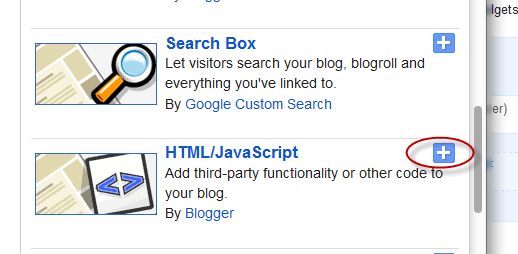
 7. From the pop-up window, scroll down and select HTML/JavaScript


8. Paste the code in the empty HTML box.


9. Click Save and you're done.

Baca Selengkapnya ....

How to create a Facebook Fan Page for your Blog

Posted by Unknown Jumat, 09 Maret 2012 0 komentar
What is a Facebook Page?

Sometimes referred to as a "Fan Page," a Facebook page is a single page where you can share & talk about any particular subject you want: a celebrity, a blog or whatever your heart desires. Think of it as a one-page meeting place, with information, links, a message forum box, RSS and anything else you want.

make money online, facebook, how to

Want to promote your blog? Then Facebook is one of the best choices when it comes about Social Networking Sites. To see how a Facebook Fan Page looks like, please visit my Facebook Fan Page.

Create a Facebook Fan Page for your blog.


Step 1. Go to the Create Fan Page Link on Facebook and select Brand or Product

facebook popular, facebook friends

Search for "Website" in the drop down list and provide the Page name (e.g., name of your blog) in the next box. Check the "I agree to Facebook Pages Terms" box, then click on the "Get Started" button.


Step 2. You will be transferred to the next page - here you can "Upload an Image" for your Fan Page or Skip to upload it later. Browse for your image clicking on the "Upload from computer" link:


Step 3. Enter your site/blog description and the url address. These informations will appear on your Facebook page. After you have finished, click "Save info".


Step 4. Now you are transferred to your new Facebook Fan Page. To "Manage" your information, click on the "Manage" Button at top right corner of the page.

Get a Shorter Facebook Fan Page URL

Your Fan Page URL will look something like:
http://www.facebook.com/pages/Helplogger/120574614736021

Now, if you have minimum 25 fans, you the possibility to shorten your facebook URL, to look something like this: http://www.facebook.com/helplogger

For this, go to http://www.facebook.com/username/ and click on set a username for your pages.


There you can select the username for your fan page. Be careful when you choose your Facebook Fan Page Username because you can't change it back afterwards.

Use RSS Graffiti Application to share your most recent blog posts

If you want to automatically add your blog posts to Facebook, then use the RSS Graffiti Application.
Steps:

1. go to http://apps.facebook.com/rssgraffiti/ and authorize RSS Graffiti: click on the "Click here to authorize RSS Graffiti" button.
2. once authorized, you will see a list of your fan pages on the left: click on the Fan Page Name
3. authorize RSS Graffiti to access your fan page: click on "Click to authorize" button.
4. Click on the Add Feed Button, and enter your feed url.

For example, if your blog is http://yourblog.blogspot.com, then your feed URL will be http://yourblog.blogspot.com/rss.xml

Click the link which says "click here to fetch and preview" and see if its grabbing your blog feed. (if it's not grabbing your feed, then check if you have enabled the blog feeds. If your blog is not hosted on blogger, then your feed url will be different.)

5. After you have added your blog feed, go to the Filter Tab and click on the Change link next to the "Cut-off date/time". Choose the latest posts of your blog from the drop down and click on the Save button.

You don't need to worry if your posts don't appear immediately on your Facebook Fan Page Wall, there might be some delay in the wall getting updated, as RSS Graffiti checks the feed for new entries at regular time intervals.

Baca Selengkapnya ....
Trik SEO Terbaru support Online Shop Baju Wanita - Original design by Bamz | Copyright of Android rush.